Installation

Install the package using npm:

Getting Started

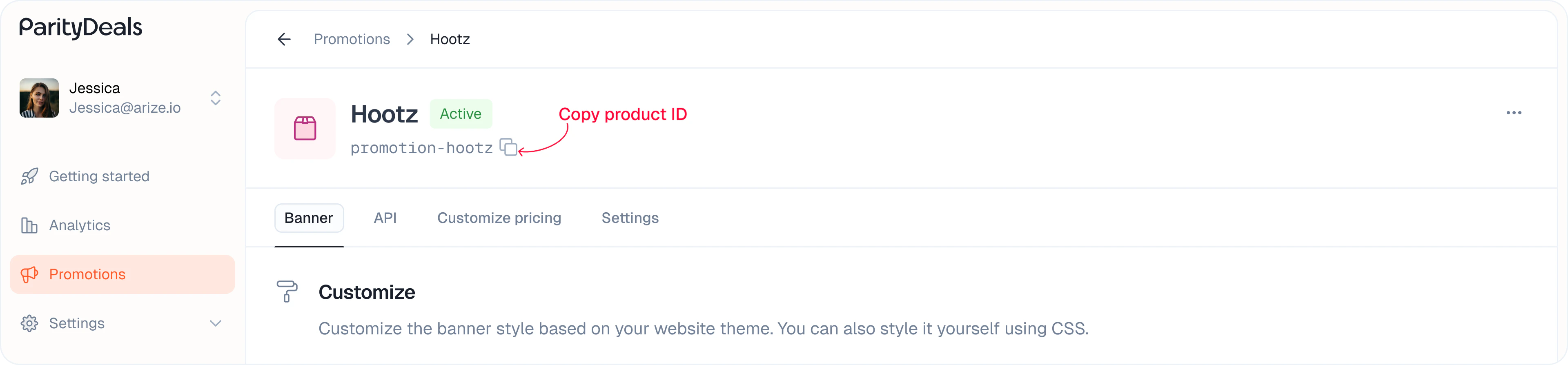
To start using the SDK, wrap your app with the ParityDealsProvider at the root level. This sets up the necessary context. You can copy your product ID from the listing or promotion details page:

Attributes:

You can use the following attributes to customize the behavior of the components.

Components

Use these ready-made UI components to easily show location-aware pricing and promotional content.

PDBanner

Displays a location-aware discount banner. You can style and position it as needed.

PDPriceFormatted

Simplified component to display discounted and original prices dynamically based on the user’s location.

Display Discounted Price

Use this to show the localized or discounted price. The price is automatically formatted based on the user’s location, including currency symbols, decimal separators, and digit grouping — for example, ₹9,999.99 for India, ¥10,000 for Japan, and 9.999,99 € for Italy where the currency symbol appears on the right.
Configuration Options

Display Original Price (Strikethrough)

Optionally show the original price with a strikethrough effect:

Example Usage

Combine both for a side-by-side comparison:

Granular Price Components

Use these components individually to build custom price formats with full styling control.

PDPriceInteger

Displays just the integer part of the price.
Configuration Options

PDPriceDecimal

Displays just the decimal portion.
Configuration Options

PDPriceCurrencySymbol

Renders the currency symbol (like $, ₹, €).
Configuration Options

PDPriceCurrencyCode

Renders the full currency code (like USD, INR, EUR).
Configuration Options

PDPriceDecimalSeparator

Renders the decimal separator based on the user’s location (e.g., ”.”).
Configuration Options

Custom Display Example

Example using all components to create a custom layout:

Support

Need help or have questions? Reach out to us anytime at hi@paritydeals.com.