Quick Start
Get dynamic, localized pricing on your site in just two steps:
1. Add the Script
Paste this snippet just before the closing </head> tag on your pricing page:
2. Initialize the SDK
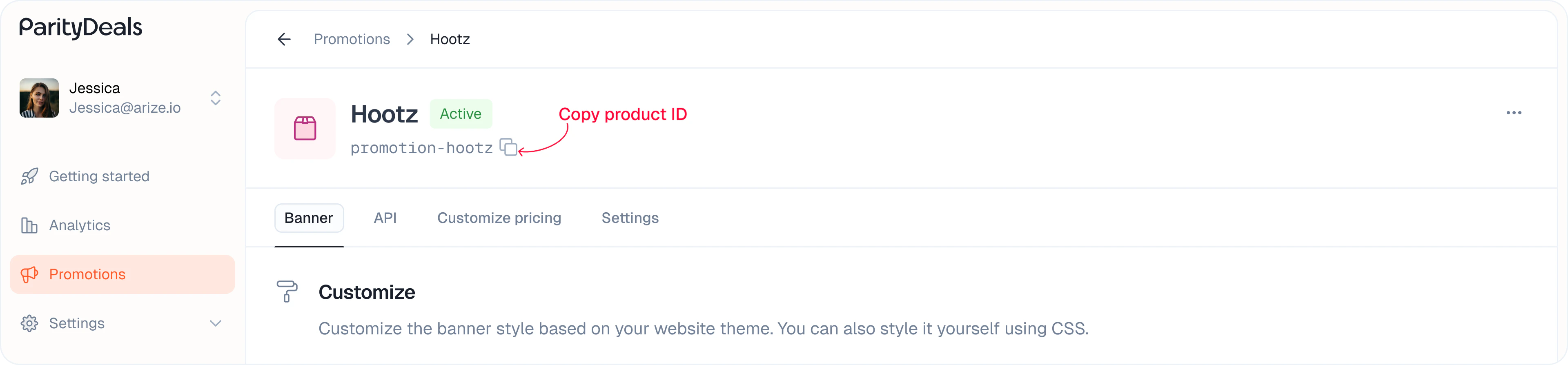
Copy your product ID from the listing or promotion details page:
This will automatically display a discount banner if the user is eligible for a discount.
Displaying Dynamic Prices (Basic)
The easiest way to show dynamic prices is to add the data-pd-price attribute to a wrapper element, and place a child element with data-pd-price-formatted where you want the price to appear. The SDK will automatically update this with the correct price for each visitor.
Example:
That’s it! The SDK will find and update these prices automatically.
Customizing Price Display (Basic)
If you want to style different parts of the price (like the currency symbol or decimals), you can break the price into parts using these attributes inside a container with data-pd-price:
| Data Attribute | Description |
|---|
data-pd-price-formatted | The full formatted price (e.g., “$99.50”) |
data-pd-currency-symbol | Only the currency symbol (e.g., ”$“) |
data-pd-currency-code | 3-letter currency code (e.g., “USD”) |
data-pd-price-integer | Integer part of the price (e.g., “99”) |
data-pd-price-decimal | Decimal part (e.g., “50”) |
data-pd-price-decimal-separator | The decimal separator (e.g., ”.”) |
Example:
SDK Configuration Options
| Option | Type | Default | Description |
|---|
productId | string | ” | The product ID to display |
showBanner | boolean | true | Whether to show the discount banner |
localizePricing | boolean | true | Convert to local currency |
baseCurrencyCode | string | USD | If you use any base currency other than USD, you must provide this. Currency conversion will be done using this code. |
baseCurrencySymbol | string | $ | If you use any base currency other than USD, you must provide this. Only for the displaying purpose, but still important. |
currencyDisplay | symbol|code|name | symbol | The currency display format. This only works on the data-pd-price-formatted element. |
showDecimal | boolean | false | Whether to show decimals |
minimumDecimalDigits | number | 0 | The minimum number of decimal digits |
maximumDecimalDigits | number | 2 | The maximum number of decimal digits. Maximum is 2. |
banner.* | object | — | Customization for the discount banner |
banner.noStyles | boolean | false | if true, no styling will be applied to the banner |
banner.showCloseButton | boolean | true | Control close button visibility. This setting will work only if close button is enabled from the ParityDeals banner settings |
banner.placement | top|bottom | ’top’ | The placement of the discount banner |
banner.container | string | null | The container for the discount banner |
banner.backgroundColor | string | ’#f0f0f0’ | The background color of the discount banner |
banner.fontColor | string | ’#333333’ | The font color of the discount banner |
banner.borderRadius | string | ’0px’ | The border radius of the discount banner |
banner.fontSize | string | ’14px’ | The font size of the discount banner |
data-props override
You can override the default properties of the price elements by adding a data-props attribute to the element.
Example:
In the below example, we override the showDecimal property to false.
Supported attributes
data-pd-show-decimal - Whether to show decimals
data-pd-localize-pricing - Whether to localize the pricing
data-pd-minimum-decimal-digits - The minimum number of decimal digits
data-pd-maximum-decimal-digits - The maximum number of decimal digits
data-pd-currency-display - The currency display format
Advanced Usage
Grouping and Strikethrough Prices
For more complex pricing layouts, you can use these advanced attributes:
data-pd-original-price-display: Shows a “compare at” or strikethrough price (never discounted, but can be localized).
data-pd-rel: Groups related price elements so they update together (e.g., main price and strikethrough).
Example:
You can assign the same data-pd-rel value to all elements that should update together.
API Reference (Advanced)
All SDK functions are asynchronous and return a Promise.
None of the below finctions inherit the configuration options set in the init function. You need to pass the options for each function call.
getUpdatedPrice
Calculate and return the updated price for a given base price (does not update the DOM):
updatePriceElement
Update a specific DOM element’s price:
updatePrice
Bulk update multiple price elements with custom templates:
Support
Need help or have questions? Reach out to us anytime at hi@paritydeals.com.