> ## Documentation Index
> Fetch the complete documentation index at: https://docs.paritydeals.com/llms.txt
> Use this file to discover all available pages before exploring further.
# React Promotions UI
> A React SDK for integrating ParityDeals dynamic pricing and discounts directly into your React application.
## Installation
Install the package using npm:
```bash theme={null}
npm install @paritydeals/react-promotions-ui
```
## Getting Started
To start using the SDK, wrap your app with the `ParityDealsProvider` at the root level. This sets up the necessary context.
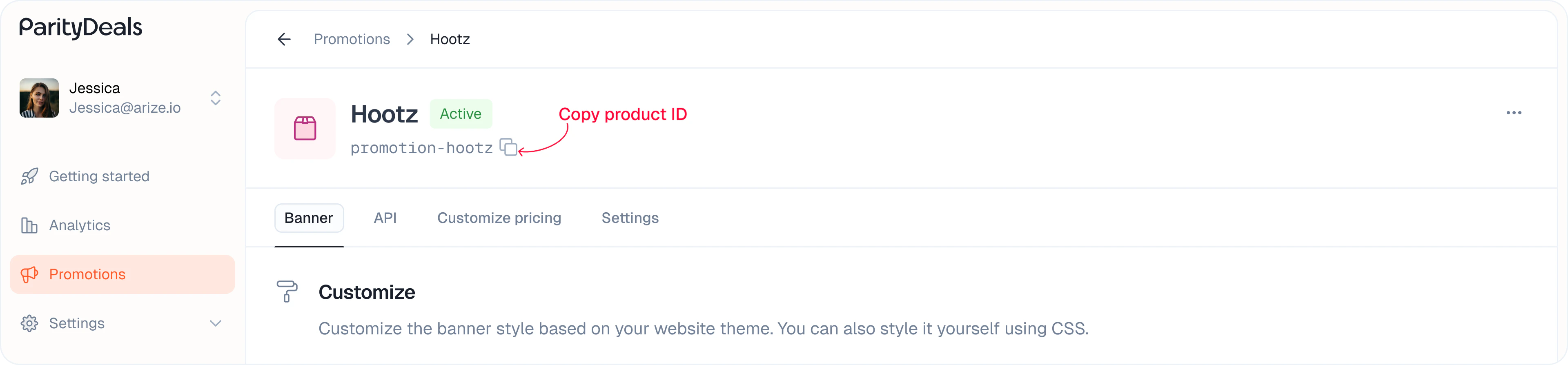
You can copy your product ID from the listing or promotion details page:
 ```tsx theme={null}
import { ParityDealsProvider } from '@paritydeals/react-promotions-ui';
function App() {
return (
// Replace with your product ID of the promotion
{/* Your app components */}
);
}
```
## Attributes:
You can use the following attributes to customize the behavior of the components.
| Attribute | Type | Default | Description |
| -------------------- | ------ | ------- | ------------------------------------------------------------------------------------------------------------------------- |
| `productId` | string | '' | The product ID to display |
| `baseCurrencyCode` | string | USD | If you use any base currency other than USD, you must provide this. Currency conversion will be done using this code. |
| `baseCurrencySymbol` | string | \$ | If you use any base currency other than USD, you must provide this. Only for the displaying purpose, but still important. |
***
## Components
Use these ready-made UI components to easily show location-aware pricing and promotional content.
### `PDBanner`
Displays a location-aware discount banner. You can style and position it as needed.
```tsx theme={null}
import { PDBanner } from '@paritydeals/react-promotions-ui';
console.log('Banner closed')}
/>
```
***
### PDPriceFormatted
Simplified component to display discounted and original prices dynamically based on the user’s location.
#### Display Discounted Price
Use this to show the localized or discounted price. The price is automatically formatted based on the user's location, including currency symbols, decimal separators, and digit grouping — for example, ₹9,999.99 for India, ¥10,000 for Japan, and 9.999,99 € for Italy where the currency symbol appears on the right.
```tsx theme={null}
```
##### Configuration Options
| Option | Type | Default | Description |
| ---------------------- | -------------------- | ------- | --------------------------------------------------------------------------------------------------------------------------------------------------------------------------------------------------------- |
| `localizePricing` | boolean | true | Convert to local currency |
| `price` (required) | number | 0 | The price of the product. |
| `className` | string | '' | custom class name for the component |
| `currencyDisplay` | `symbol\|code\|name` | symbol | The currency display format. This only works on the `data-pd-price-formatted` element. |
| `showDecimal` | boolean | false | Whether to show decimals |
| `minimumDecimalDigits` | number | 0 | The minimum number of decimal digits |
| `maximumDecimalDigits` | number | 2 | The maximum number of decimal digits. Maximum is 2. |
| `isOriginalDisplay` | boolean | false | Used to show the original price when there’s a discount, typically for comparison (e.g., strikethrough price). This price is not modified by discounts but may still be affected by currency conversions. |
| `displayPrice` | number | 0 | The price to display. If not provided, the original price will be displayed. |
#### Display Original Price (Strikethrough)
Optionally show the original price with a strikethrough effect:
```tsx theme={null}
```
#### Example Usage
Combine both for a side-by-side comparison:
```tsx theme={null}
```
***
## Granular Price Components
Use these components individually to build custom price formats with full styling control.
### PDPriceInteger
Displays just the integer part of the price.
```tsx theme={null}
```
##### Configuration Options
| Option | Type | Default | Description |
| ------------------ | ------- | ------- | ----------------------------------- |
| `localizePricing` | boolean | true | Convert to local currency |
| `price` (required) | number | 0 | The price of the product. |
| `className` | string | '' | custom class name for the component |
***
### PDPriceDecimal
Displays just the decimal portion.
```tsx theme={null}
```
##### Configuration Options
| Option | Type | Default | Description |
| ---------------------- | ------- | ------- | --------------------------------------------------- |
| `localizePricing` | boolean | true | Convert to local currency |
| `price` (required) | number | 0 | The price of the product. |
| `className` | string | '' | custom class name for the component |
| `minimumDecimalDigits` | number | 0 | The minimum number of decimal digits |
| `maximumDecimalDigits` | number | 2 | The maximum number of decimal digits. Maximum is 2. |
***
### PDPriceCurrencySymbol
Renders the currency symbol (like \$, ₹, €).
```tsx theme={null}
```
##### Configuration Options
| Option | Type | Default | Description |
| ----------------- | ------- | ------- | ----------------------------------- |
| `localizePricing` | boolean | true | Convert to local currency |
| `className` | string | '' | custom class name for the component |
***
### `PDPriceCurrencyCode`
Renders the full currency code (like USD, INR, EUR).
```tsx theme={null}
```
##### Configuration Options
| Option | Type | Default | Description |
| ----------------- | ------- | ------- | ----------------------------------- |
| `localizePricing` | boolean | true | Convert to local currency |
| `className` | string | '' | custom class name for the component |
***
### PDPriceDecimalSeparator
Renders the decimal separator based on the user's location (e.g., ".").
```tsx theme={null}
```
##### Configuration Options
| Option | Type | Default | Description |
| ------------------ | ------- | ------- | ----------------------------------- |
| `localizePricing` | boolean | true | Convert to local currency |
| `price` (required) | number | 0 | The price of the product. |
| `className` | string | '' | custom class name for the component |
### Custom Display Example
Example using all components to create a custom layout:
```tsx theme={null}
```
***
## Support
Need help or have questions? Reach out to us anytime at **[hi@paritydeals.com](mailto:hi@paritydeals.com)**.
```tsx theme={null}
import { ParityDealsProvider } from '@paritydeals/react-promotions-ui';
function App() {
return (
// Replace with your product ID of the promotion
{/* Your app components */}
);
}
```
## Attributes:
You can use the following attributes to customize the behavior of the components.
| Attribute | Type | Default | Description |
| -------------------- | ------ | ------- | ------------------------------------------------------------------------------------------------------------------------- |
| `productId` | string | '' | The product ID to display |
| `baseCurrencyCode` | string | USD | If you use any base currency other than USD, you must provide this. Currency conversion will be done using this code. |
| `baseCurrencySymbol` | string | \$ | If you use any base currency other than USD, you must provide this. Only for the displaying purpose, but still important. |
***
## Components
Use these ready-made UI components to easily show location-aware pricing and promotional content.
### `PDBanner`
Displays a location-aware discount banner. You can style and position it as needed.
```tsx theme={null}
import { PDBanner } from '@paritydeals/react-promotions-ui';
console.log('Banner closed')}
/>
```
***
### PDPriceFormatted
Simplified component to display discounted and original prices dynamically based on the user’s location.
#### Display Discounted Price
Use this to show the localized or discounted price. The price is automatically formatted based on the user's location, including currency symbols, decimal separators, and digit grouping — for example, ₹9,999.99 for India, ¥10,000 for Japan, and 9.999,99 € for Italy where the currency symbol appears on the right.
```tsx theme={null}
```
##### Configuration Options
| Option | Type | Default | Description |
| ---------------------- | -------------------- | ------- | --------------------------------------------------------------------------------------------------------------------------------------------------------------------------------------------------------- |
| `localizePricing` | boolean | true | Convert to local currency |
| `price` (required) | number | 0 | The price of the product. |
| `className` | string | '' | custom class name for the component |
| `currencyDisplay` | `symbol\|code\|name` | symbol | The currency display format. This only works on the `data-pd-price-formatted` element. |
| `showDecimal` | boolean | false | Whether to show decimals |
| `minimumDecimalDigits` | number | 0 | The minimum number of decimal digits |
| `maximumDecimalDigits` | number | 2 | The maximum number of decimal digits. Maximum is 2. |
| `isOriginalDisplay` | boolean | false | Used to show the original price when there’s a discount, typically for comparison (e.g., strikethrough price). This price is not modified by discounts but may still be affected by currency conversions. |
| `displayPrice` | number | 0 | The price to display. If not provided, the original price will be displayed. |
#### Display Original Price (Strikethrough)
Optionally show the original price with a strikethrough effect:
```tsx theme={null}
```
#### Example Usage
Combine both for a side-by-side comparison:
```tsx theme={null}
```
***
## Granular Price Components
Use these components individually to build custom price formats with full styling control.
### PDPriceInteger
Displays just the integer part of the price.
```tsx theme={null}
```
##### Configuration Options
| Option | Type | Default | Description |
| ------------------ | ------- | ------- | ----------------------------------- |
| `localizePricing` | boolean | true | Convert to local currency |
| `price` (required) | number | 0 | The price of the product. |
| `className` | string | '' | custom class name for the component |
***
### PDPriceDecimal
Displays just the decimal portion.
```tsx theme={null}
```
##### Configuration Options
| Option | Type | Default | Description |
| ---------------------- | ------- | ------- | --------------------------------------------------- |
| `localizePricing` | boolean | true | Convert to local currency |
| `price` (required) | number | 0 | The price of the product. |
| `className` | string | '' | custom class name for the component |
| `minimumDecimalDigits` | number | 0 | The minimum number of decimal digits |
| `maximumDecimalDigits` | number | 2 | The maximum number of decimal digits. Maximum is 2. |
***
### PDPriceCurrencySymbol
Renders the currency symbol (like \$, ₹, €).
```tsx theme={null}
```
##### Configuration Options
| Option | Type | Default | Description |
| ----------------- | ------- | ------- | ----------------------------------- |
| `localizePricing` | boolean | true | Convert to local currency |
| `className` | string | '' | custom class name for the component |
***
### `PDPriceCurrencyCode`
Renders the full currency code (like USD, INR, EUR).
```tsx theme={null}
```
##### Configuration Options
| Option | Type | Default | Description |
| ----------------- | ------- | ------- | ----------------------------------- |
| `localizePricing` | boolean | true | Convert to local currency |
| `className` | string | '' | custom class name for the component |
***
### PDPriceDecimalSeparator
Renders the decimal separator based on the user's location (e.g., ".").
```tsx theme={null}
```
##### Configuration Options
| Option | Type | Default | Description |
| ------------------ | ------- | ------- | ----------------------------------- |
| `localizePricing` | boolean | true | Convert to local currency |
| `price` (required) | number | 0 | The price of the product. |
| `className` | string | '' | custom class name for the component |
### Custom Display Example
Example using all components to create a custom layout:
```tsx theme={null}
```
***
## Support
Need help or have questions? Reach out to us anytime at **[hi@paritydeals.com](mailto:hi@paritydeals.com)**.